


How to Whitelist Emails from Pachamama Sacred Paths
To ensure you never miss important emails from retreats@sacredpachamama.org, please follow the instructions below for your email provider. Whitelisting (also called “safe listing”) tells your email service to always deliver our emails to your inbox instead of your spam folder.
Senders to whitelist
Gmail.com
Method 1: Create a Filter (Recommended)
-
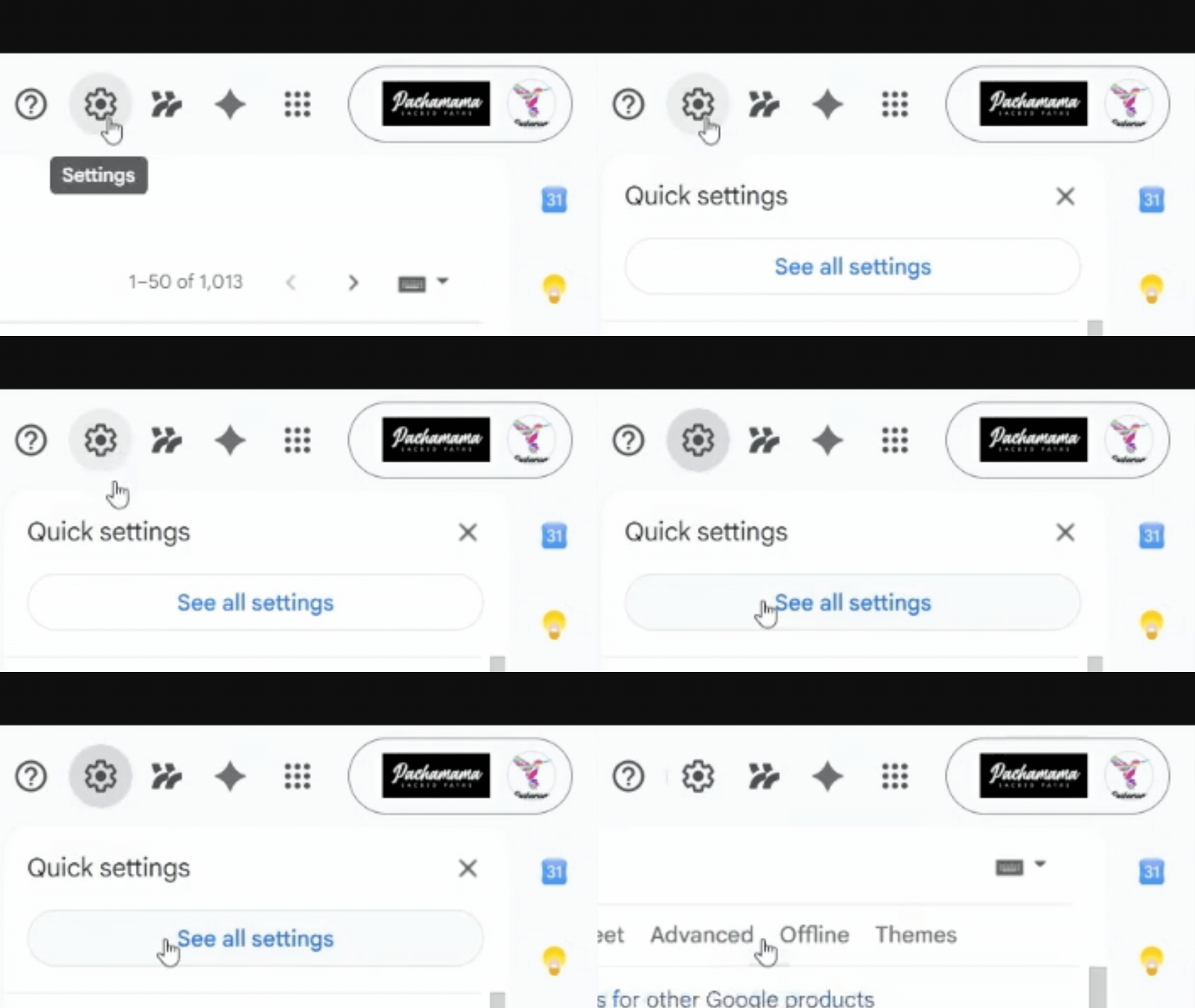
Open Gmail and click the gear icon in the top-right corner
-
Select “See all settings”
-
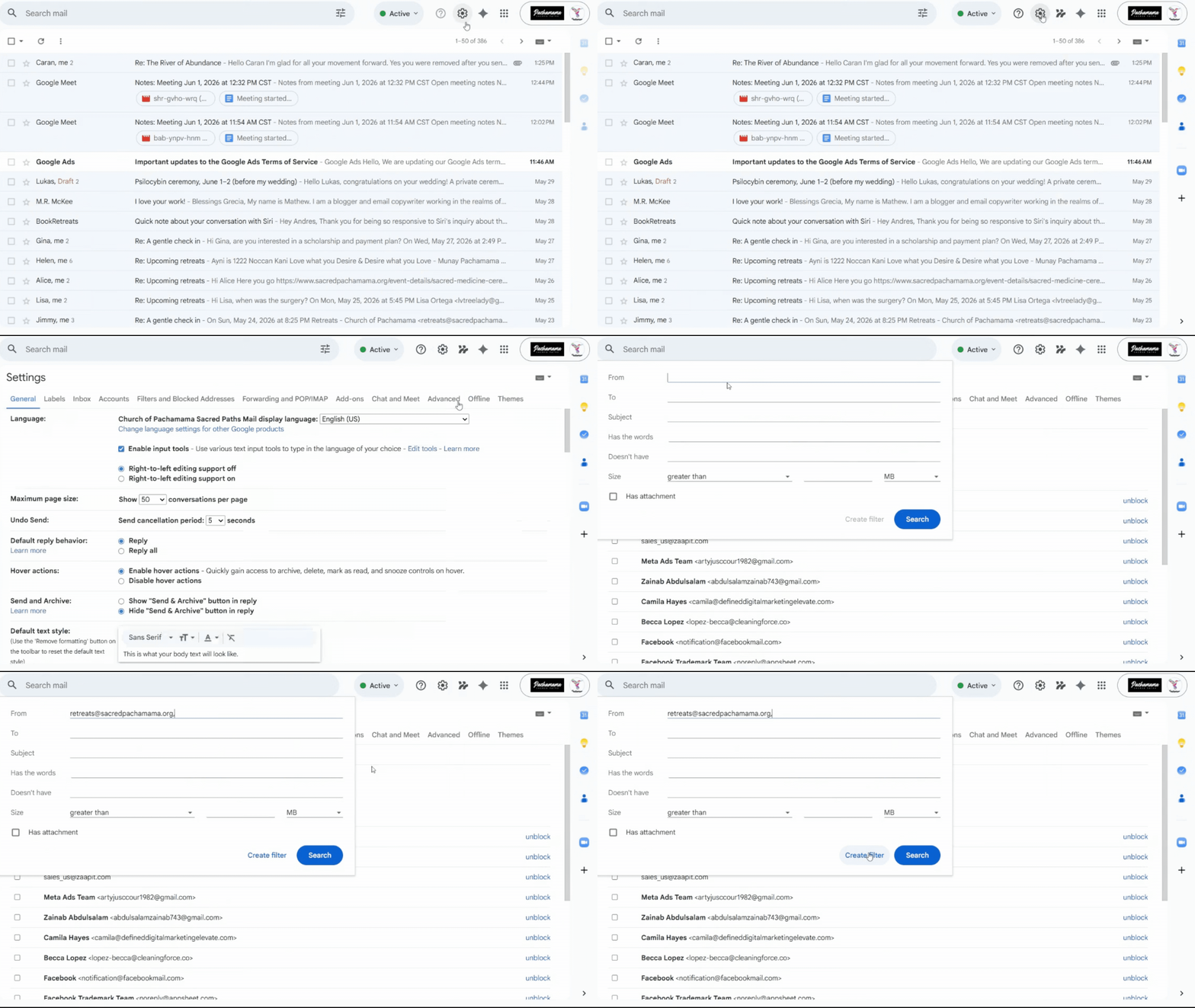
Click the “Filters and Blocked Addresses” tab
-
Click “Create a new filter”
-
In the “From” field, enter:
retreats@sacredpachamama.org -
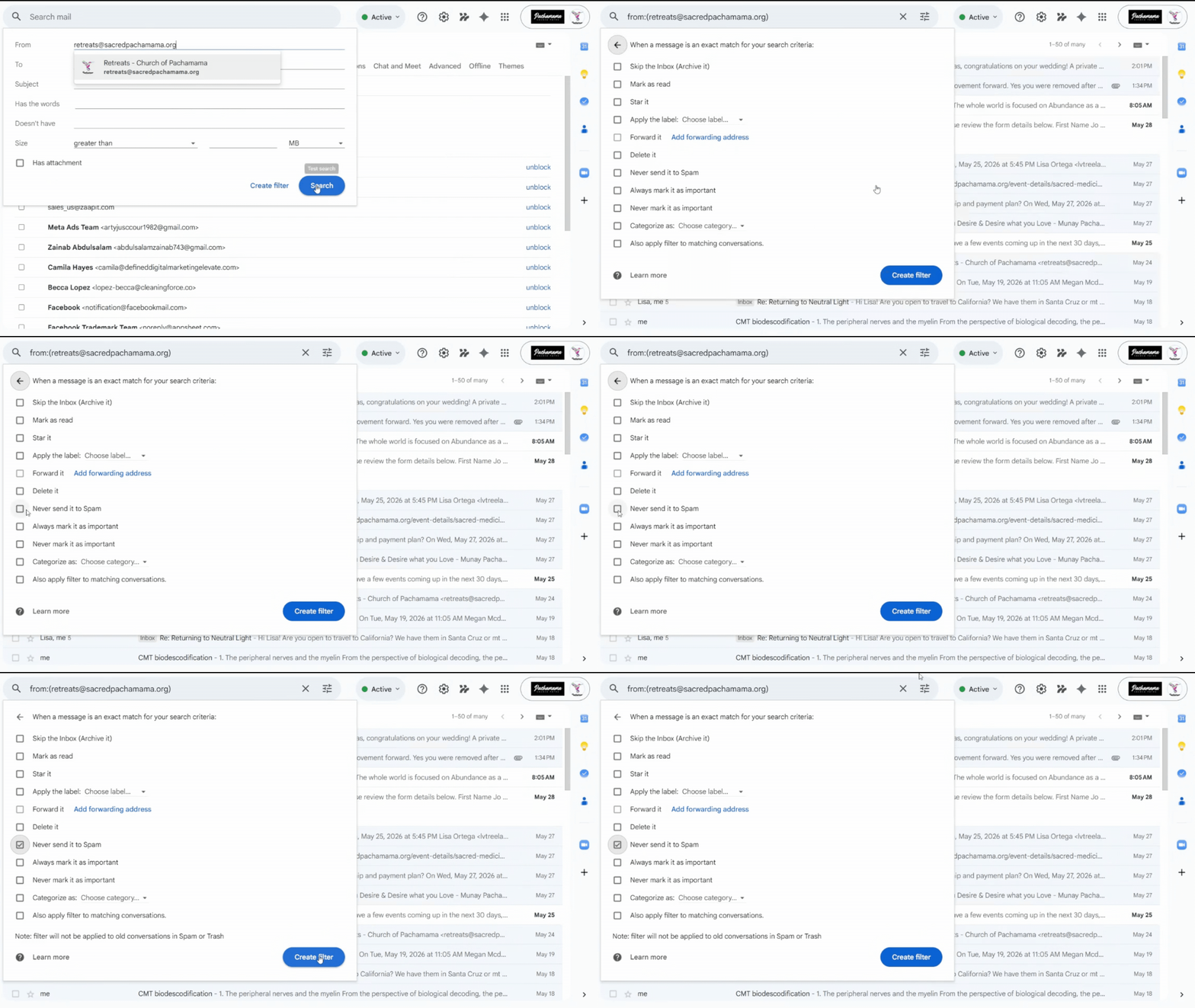
Click “Create filter”
-
Check the box “Never send it to Spam”
-
Click “Create filter” again to save
Add to Contacts:
-
Hover over name.
-
Check icon with the plus and person icon to Add to Contacts
Yahoo.com
Method 1: Create a Filter (Recommended)
-
Open Yahoo Mail and click the gear icon in the top-right
-
Select “More Settings”
-
Click “Filters” from the left menu
-
Click “Add new filters”
-
Give your filter a name like “Church of Pachamama”
-
In the “Sender” field, select “contains”
-
Enter: retreats@sacredpachamama.org
-
Set the action to “Deliver to Inbox”
-
Click “Save”
Method 2: Add to Contacts
-
Click the “Contacts” icon in Yahoo Mail
-
Click “Add a new contact”
-
Enter “Church of Pachamama” as the name
-
Add:
-
Click “Save”
If Emails Are Already in Spam
-
Go to your Spam folder
-
Find and open the email from Church of Pachamama
-
Click “Not Spam” at the top of the email
Hotmail.com / Outlook.com
Method 1: Safe Senders List (Recommended)
-
Open Outlook.com and click the gear icon in the top-right
-
Select “View all Outlook settings”
-
Click “Mail” from the left menu
-
Select “Junk email”
-
Under “Safe senders and domains”, click “Add”
-
Enter: retreats@sacredpachamama.org → Press Enter (or click the +)
-
Add: retreats@sacredpachamama.org → Press Enter (or click the +)
-
Click “Save” at the bottom
Method 2: Right-Click Method
-
Find an email from Church of Pachamama in your inbox or junk folder
-
Right-click on the email
-
Select “Junk” then “Never block sender”
-
Confirm by clicking “OK”
If Emails Are Already in Junk
-
Go to your Junk Email folder
-
Find the email from Church of Pachamama
-
Click “Not junk” in the toolbar
AOL.com
Method 1: Add to Contacts (Recommended)
-
Open AOL Mail and click “Contacts” in the left toolbar
-
Click “Add Contact” or “New Contact”
-
Enter “Church of Pachamama” in the name field
-
In the “Email 1” field, enter: retreats@sacredpachamama.org
-
Click “Add Contact” to save
Method 2: Create a Filter
-
Click “Settings” then “More Settings”
-
Select “Filters”
-
Click “Add new filters”
-
Create a filter for emails containing sacredpachamama.org
-
Set the action to “Deliver to Inbox”
-
Save the filter
If Emails Are Already in Spam
-
Go to your Spam folder
-
Find and open the email from Church of Pachamama
-
Click “Not Spam” or the “OK” button
Comcast.net / Xfinity Email
Important Note: Comcast’s “Email Safe List” feature can block ALL emails except those on the list. We recommend using the Address Book method instead.
Method 1: Add to Address Book (Recommended)
-
Log into your Comcast email account
-
Click the envelope icon to open email
-
Click “Address Book”
-
Click “New Contact” dropdown and choose “New Contact”
-
Enter “Church of Pachamama” as the name
-
In the “Email 1” field, enter: retreats@sacredpachamama.org
-
Click “Save”
Method 2: Mark as Not Spam
-
Check your Spam folder regularly
-
If you find emails from Church of Pachamama, select the email
-
Click “Not Spam” in the toolbar
This helps train the spam filter.
Pro Tip: If emails are still being blocked at the server level, you may need to contact Comcast customer support to whitelist our domains.
Additional Tips
-
Check your spam/junk folder regularly — even with whitelisting, some emails may still land there initially
-
Add our email addresses to your phone contacts if you read email on mobile devices
-
Reply to our emails — this signals to email providers that you want to receive our communications
-
Mark our emails as important — use your email client’s star or priority features
Domains to Whitelist
-
Church of Pachamama
-
sacredpachamama.org
Need Help?
If you’re still not receiving our emails after following these instructions, please contact us and let us know:
-
Which email provider you’re using
-
Which method you tried
-
Whether you can see our emails in your spam/junk folder
We’re here to help ensure you never miss our important communications!